
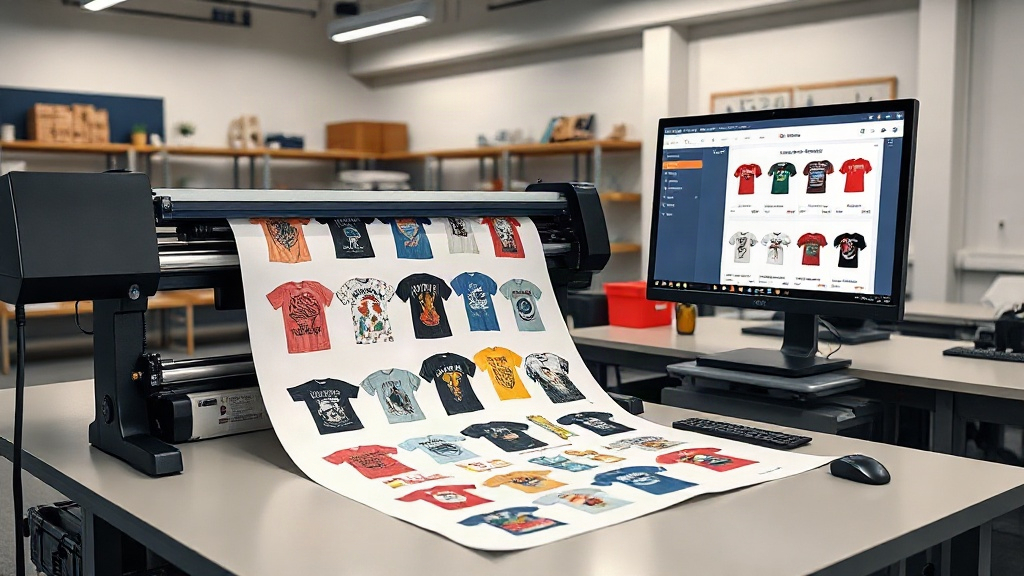
If you're in the custom apparel business, you know that efficiency and cost-effectiveness are key to staying competitive. DTF printing has emerged as a game-changer, allowing vibrant, durable transfers on a wide range of fabrics. But to truly harness its power, you need to master the DTF gangsheet builder. This tool lets you arrange multiple designs on a single sheet, maximizing your printer's output and minimizing waste. In this guide, we'll explore what gang sheets are, why they matter, and how to use a builder to supercharge your production.
What Is a DTF Gangsheet?
A gang sheet is a large sheet of DTF transfer film that contains multiple designs printed together. Instead of printing one design at a time, you 'gang' several jobs onto one sheet. This approach is similar to gang printing in offset lithography, where multiple jobs are combined to save time and materials. In DTF printing, gang sheets are typically created using specialized software or online tools known as DTF gangsheet builders.
Why Use Gang Sheets?
The primary benefit is efficiency. By grouping designs, you reduce the number of sheets used, which cuts down on film and powder consumption. You also save time because the printer runs continuously with fewer interruptions. For small orders, gang sheets allow you to offer competitive pricing without sacrificing profit margins. Additionally, gang sheets are ideal for producing multiple sizes of the same design or a variety of designs for a single client.
Common Use Cases
- Custom t-shirt orders with multiple sizes
- Team uniforms with different names and numbers
- Promotional items for events
- Sample packs for potential clients
How a DTF Gangsheet Builder Works
A DTF gangsheet builder is software that helps you arrange your designs on a virtual sheet before printing. It typically offers a drag-and-drop interface where you can upload your artwork, resize, rotate, and position each design. The builder calculates the most efficient layout, minimizing empty space. Some advanced builders even automatically nest irregular shapes to further reduce waste.
Key Features to Look For
When choosing a builder, consider these features:
- Automatic nesting: Optimizes placement to use as much of the sheet as possible.
- Size templates: Pre-set sheet dimensions for common DTF printer sizes (e.g., 13', 24', 60').
- Color management: Ensures accurate color reproduction.
- Integration: Ability to import files from popular design software.
- Cost calculator: Estimates ink and film usage per sheet.
Many online builders, like the one offered by DTF Max Print, provide these features and more, streamlining your workflow.
Benefits of Using a Gangsheet Builder
Investing time in learning a gangsheet builder pays off in several ways:
- Time savings: Manual layout is tedious; automated tools do it in seconds.
- Cost reduction: Less wasted film and powder means lower production costs.
- Increased output: Print more designs per hour, boosting capacity.
- Consistency: Standardized layouts reduce errors and reprints.
- Scalability: Easily handle larger orders without proportional increases in labor.
For a small shop, these benefits can mean the difference between breaking even and turning a profit.
Step-by-Step: Creating a Gang Sheet with a Builder
Here's a typical workflow using a DTF gangsheet builder:
- Upload your designs: Import PNG or PDF files with transparent backgrounds.
- Set sheet size: Choose the dimensions that match your printer's capabilities.
- Arrange designs: Drag and drop, rotate, and resize as needed. Use the auto-arrange feature if available.
- Check spacing: Leave a small gap between designs for easy cutting.
- Preview and adjust: Ensure all designs are within the printable area.
- Export: Save the layout as a high-resolution file for printing.
Once exported, you can print the gang sheet on your DTF printer, apply powder, and cure. The result is a sheet full of ready-to-press transfers.
Tips for Optimizing Your Gang Sheets
To get the most out of your gang sheets, follow these best practices:
- Group by color: If your printer uses CMYK+White, grouping designs with similar color profiles can reduce ink changes.
- Use standard sizes: Stick to common sheet sizes to avoid custom cutting.
- Nest tightly but leave room for cutting: Too close and you risk cutting into designs.
- Rotate designs: Sometimes rotating a design 90 degrees can save significant space.
- Keep a library: Save frequently used layouts for repeat orders.
Experiment with different arrangements to find what works best for your typical orders.
Common Mistakes to Avoid
Even with a builder, mistakes can happen. Watch out for these:
- Overcrowding: Placing designs too close can lead to cutting errors.
- Ignoring bleed: Ensure designs have enough bleed if they have borders.
- Forgetting white underbase: For dark garments, white underbase is crucial; ensure it's included.
- Not checking resolution: Low-res images will look poor when printed.
- Using the wrong sheet size: Mismatched size wastes film or causes print failures.
Double-check your layout before printing to avoid costly reprints.
Why DTF Max Print?
At DTF Max Print, we specialize in providing top-tier DTF supplies and tools, including an intuitive DTF gangsheet builder that helps you create efficient layouts quickly. Our platform is designed with your workflow in mind, offering features like automatic nesting, real-time cost estimation, and seamless integration with your existing design software. Whether you're a small startup or a large production house, our builder can scale with your needs.
We also offer high-quality DTF film, powder, and ink to complement your printing process. By combining our builder with our supplies, you can achieve professional results while keeping costs low.
Frequently Asked Questions
What is a DTF gangsheet builder?
A DTF gangsheet builder is a software tool that allows you to arrange multiple designs on a single DTF transfer film sheet. It helps optimize layout, reduce waste, and streamline printing.
Can I use a gangsheet builder for free?
Some builders offer free trials or limited free versions, but advanced features like automatic nesting often require a subscription. DTF Max Print offers a free basic plan with options to upgrade.
How do I choose the right sheet size?
Consider your printer's maximum print width and the size of your typical orders. Common sizes are 13', 24', and 60' wide. Choose the smallest size that fits your designs to minimize waste.
What file formats work best for gang sheets?
PNG files with transparent backgrounds are ideal. PDF and TIFF are also supported by most builders. Ensure high resolution (300 DPI) for best results.
Can I reuse a gang sheet layout?
Yes, most builders allow you to save layouts as templates. This is perfect for repeat orders or similar jobs.
How does a gangsheet builder save money?
By maximizing the use of each sheet, you reduce film and powder consumption. Less waste means lower material costs and higher profit margins.
Conclusion
Mastering the DTF gangsheet builder is essential for any serious DTF printer. It transforms a tedious task into a quick, automated process, saving you time and money. With the tips and best practices outlined here, you can create efficient gang sheets that boost your production and impress your customers. Visit DTF Max Print to explore our gangsheet builder and take your DTF printing to the next level.