
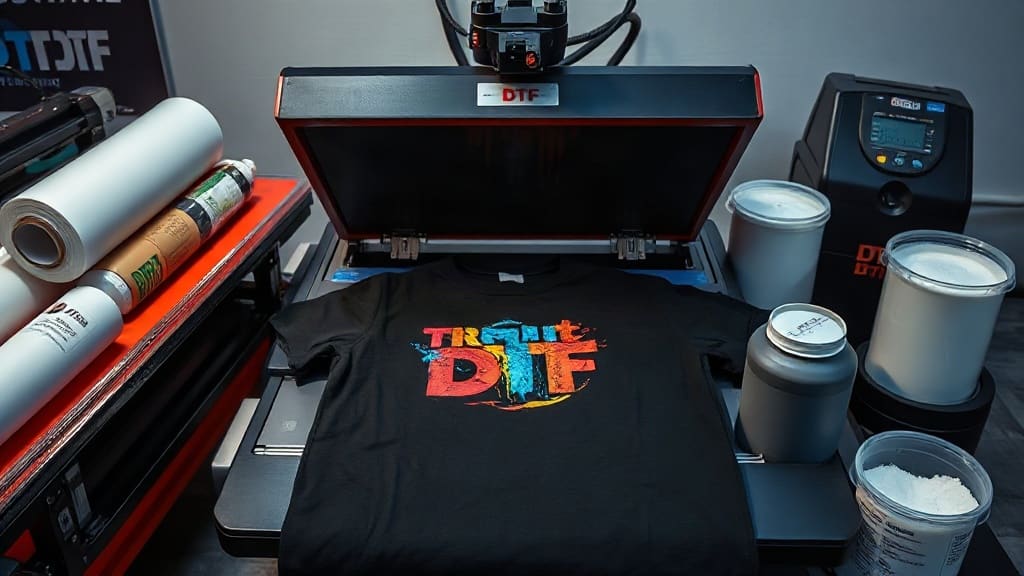
If you've ever wanted to create custom apparel with vibrant colors and intricate details, DTF (Direct to Film) is likely the buzzword you've encountered. This printing method has taken the industry by storm, offering an alternative to traditional screen printing and heat transfer vinyl. In this guide, we'll dive deep into DTF transfers, how they work, and why they might be the perfect solution for your next project. Whether you're a business owner or a hobbyist, understanding this technology can open up a world of possibilities.
What Are DTF Transfers?
DTF stands for Direct to Film, a printing process that involves printing your design onto a special film, applying adhesive powder, and then heat pressing it onto fabric. Unlike other methods, DTF allows for high-detail, full-color prints on a wide variety of materials, including cotton, polyester, blends, and even some hard surfaces.
The beauty of DTF transfers lies in their versatility. You can reproduce complex designs with gradients, small text, and photographic images without sacrificing quality. Plus, the transfers are durable, stretchable, and washable, making them a favorite for apparel manufacturers and print shops.
How Does DTF Printing Work?
To understand DTF, let's break down the process step by step:
- Design Creation: Start with a digital file of your design. Ensure it's high-resolution for the best output.
- Printing: A specialized DTF printer prints the design onto a clear PET film using CMYK plus white ink. The white ink acts as a base, making the colors pop on dark and light fabrics.
- Adhesive Application: While the ink is still wet, you apply a hot-melt adhesive powder to the film. The powder sticks to the printed areas, creating an adhesive layer.
- Curing: The film with the design and powder goes through a curing unit or heat press to melt the adhesive and bond it to the ink.
- Transfer: Finally, you place the film on your substrate (the garment or item) and heat press it. The design transfers from the film to the material, creating a permanent bond.
This process may sound straightforward, but it requires precision and the right equipment. However, once mastered, it's incredibly efficient.
Why Choose DTF Transfers Over Other Methods?
There are several reasons why DTF has become a go-to for custom printing:
- Versatility: DTF works on almost any fabric, including those tricky ones like nylon and spandex.
- Soft Hand Feel: The prints have a soft, rubber-like texture that doesn't crack or peel easily.
- High Detail: You can achieve sharp details and vibrant colors, even on dark garments.
- No Weeding: Unlike vinyl, there's no need to weed out excess material. The design is ready to transfer as-is.
- Cost-Effective for Small Runs: Setting up for screen printing can be expensive, but DTF is perfect for small quantities, making it ideal for custom orders.
What Do You Need to Start with DTF?
If you're considering diving into DTF, here's what you'll need:
- DTF Printer: A printer that can handle DTF inks, typically a modified Epson or other compatible model.
- DTF Inks: CMYK and white ink specifically formulated for DTF.
- DTF Film: PET film designed to release the print cleanly.
- Adhesive Powder: Hot-melt powder that activates with heat.
- Heat Press: To transfer the design onto your substrate.
- Curing Unit (optional but recommended): To pre-cure the powder before transfer, ensuring consistent results.
Once you have these, you can start producing your own DTF transfers at home or in your shop.
How to Find DTF Transfers Near Me?
If you don't want to invest in equipment, you can always purchase ready-made DTF transfers near me. A quick search online or in local business directories can yield several suppliers. When looking for a provider, consider these factors:
- Quality: Look for reviews and examples of their work.
- Turnaround Time: How quickly can they produce and ship?
- Pricing: Compare costs per transfer, especially for bulk orders.
- Minimum Order Quantities: Some suppliers have high MOQs, which might not suit small projects.
Supporting local businesses can be beneficial for shipping times and personalized service. However, don't overlook online options, as they often offer more variety and competitive pricing.
Tips for Getting the Best DTF Results
Whether you're doing it yourself or using a service, here are some pro tips to ensure your DTF prints come out perfect:
- Use High-Resolution Files: Low-res images lead to pixelated prints. Always use at least 300 DPI.
- Test on Scrap Fabric: Before committing to a full run, test a sample to check colors and adhesion.
- Follow Temperature and Time Guidelines: Different fabrics require different heat press settings. Typically, 300-320°F for 10-15 seconds works well, but adjust as needed.
- Handle the Film Carefully: The printed film is delicate until cured. Avoid smudging the powder.
- Store Transfers Properly: Keep unused transfers in a cool, dry place to prevent adhesive degradation.
Common Mistakes to Avoid
Even experienced printers can make errors. Here are common pitfalls and how to avoid them:
- Using the Wrong Film: Make sure you use DTF-specific film, not vinyl or printable transparency.
- Insufficient Adhesive: If you apply too little powder, the design may not stick properly. Ensure even coverage.
- Incorrect Heat Press Pressure: Too much pressure can squeeze out adhesive, while too little leads to poor transfer. Find the sweet spot.
- Ignoring Humidity: High humidity can affect the powder and film. Work in a controlled environment.
Applications of DTF Transfers
DTF isn't just for t-shirts. You can use it on:
- Polo shirts, hoodies, and sweatshirts
- Tote bags and backpacks
- Mouse pads and coasters
- Aprons and hats (with care)
- Even leather and canvas materials
The possibilities are nearly endless, making DTF a valuable asset for any custom printing business.
The Future of DTF Printing
The popularity of DTF continues to grow. As technology advances, we can expect faster printers, more eco-friendly inks, and even better durability. For now, it's a fantastic time to get involved. Whether you're starting a side hustle or upgrading your print shop, DTF transfers offer a reliable and profitable avenue.
Conclusion
In summary, DTF is a game-changer in the custom printing industry. Its ability to produce high-quality, versatile prints with minimal setup makes it accessible to everyone. Whether you choose to invest in your own DTF setup or seek out DTF transfers near me, this technology allows you to bring your creative visions to life.
Frequently Asked Questions
Can DTF transfers be used on dark-colored shirts?
Yes, absolutely. The white ink base in DTF printing ensures that your design remains vibrant and opaque on dark fabrics. This is one of the major advantages of DTF over other methods like sublimation, which only works on white or light-colored polyester.
How long do DTF transfers last?
When applied correctly, DTF transfers are extremely durable. They can withstand numerous washes without fading or cracking, often outlasting the garment itself. The key is to follow the care instructions, such as washing inside out in cold water and avoiding harsh detergents.
What is the difference between DTF and sublimation?
DTF uses a film and adhesive powder to transfer designs onto fabric, while sublimation uses heat to infuse dye into polyester fibers. DTF is more versatile because it can be used on cotton and blends, whereas sublimation only works on polyester or polyester-coated surfaces. DTF also offers a softer hand feel compared to sublimation prints.
Do I need a special printer for DTF?
Yes, you need a printer that is compatible with DTF inks and can handle the white ink circulation. While some standard inkjet printers can be converted, it's recommended to use a dedicated DTF printer for optimal results and fewer maintenance issues.
Can I make DTF transfers at home?
With the right equipment and a bit of practice, you can definitely produce DTF transfers at home. You'll need a DTF printer, inks, film, adhesive powder, and a heat press. It's a learning curve, but many hobbyists and small business owners have successfully made it work.